



AtikTeam Meet, secure web conferencing for enterprises
AtikTeam offers a new web conferencing feature that is secure, integrated into your application, and usable today with no installation required.
This new module was deployed in April 2020. Its objective is to provide our users with a fast, simple and secure way to organize an online conference.
Organize an online conference
To start a conference from your AtikTeam application, click on the Meet link at the top of your AtikTeam screen.

A new tab opens on your conference room. You will be prompted to allow access to the microphone and camera. Note that it is entirely possible to allow only the microphone for an audio conference.
The following page is then displayed (the zone annotations in green have been added).
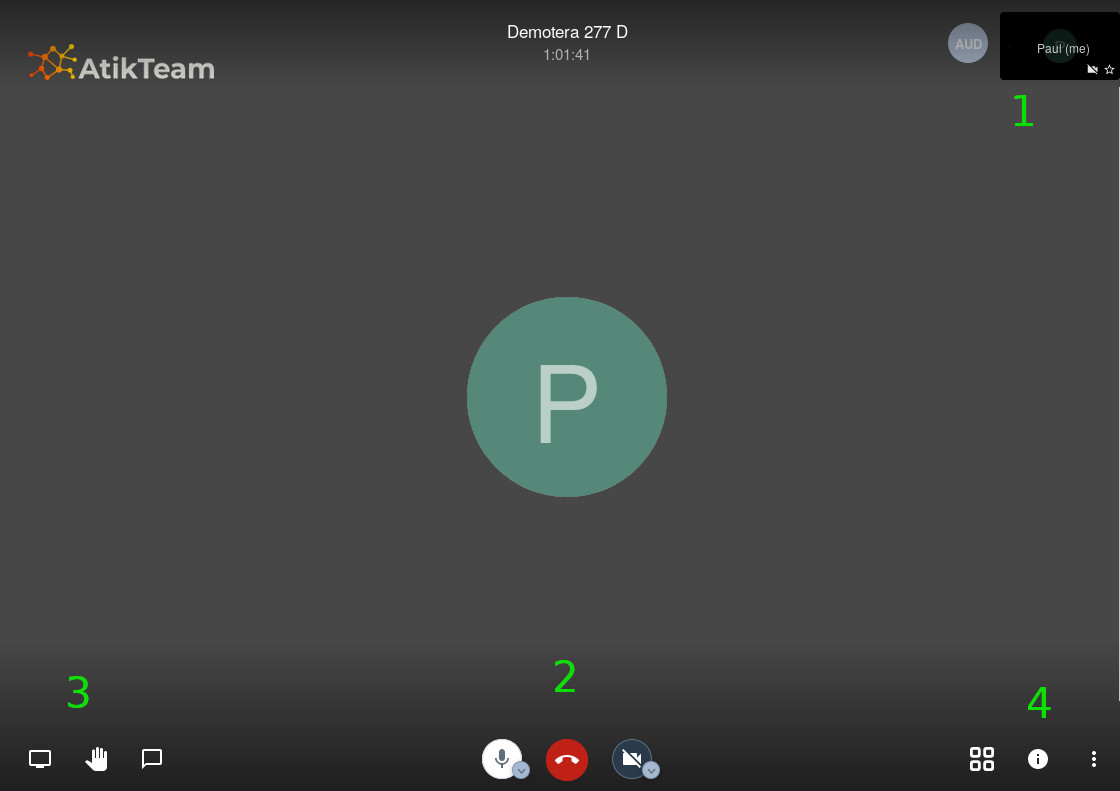
- zone 1: enter your participant name
- zone 2: you can mute / unmute your microphone and your webcam
- zone 3: conference toolbox
- screen sharing - this function shares your screen with other participants
- raised hand - request to speak
- bubble - open the chat area
- zone 4: conference settings
- mosaic - display layout
- i - information and link to share to invite an external participant
- ⋮ - settings and additional functions
Access link and security
You can invite an external person who does not have an AtikTeam account by providing the access link.
This access link is automatically generated. For security reasons, this link to your conference room is ephemeral, it is regularly renewed.
AtikTeam Meet is based on secure and proven technologies. Audio and video streams are automatically encrypted between your devices and our servers.
Mobile app
You can access AtikTeam Meet from your mobile, by installing the free "Jitsi Meet" application. In this application, go to the settings to set the conference server to the address https://meet.atikteam.com. To join a conference, use the room name provided by your AtikTeam application, for example "my-business.2b4f". Welcome, you are online.
Limitations and developments
This module was deployed very quickly to meet the needs of our users during the lockdown. Problems may arise; thank you in advance for letting us know.
Furthermore, in this first phase the conferencing module offers only one room per customer. As soon as possible, we will extend these capabilities to provide multiple conference rooms for each customer.
Technologies used and performance
AtikTeam Meet integrates the Jitsi solution, on our dedicated servers. These servers are located in the Paris area, which is why performance will be optimal in metropolitan France.
Spread the word
Are you satisfied with AtikTeam? Share the love, spread the word, let your network know.